Manipulating Yiddish texts under the Unix operating system
Author: Raphael Finkel. email
(without the underscore),
web.
Table of contents:
Choices |
Issues |
Fonts |
Xkb |
xterm |
Yudit |
Vim |
AbiWord |
mule |
emacs |
KDE |
Summary |
References |
Software keeps changing, so the recommendations in this
document, which was first written around 2005, may no longer be current.
Choices
To write Yiddish in Unix, you have these choices:
- Write in YIVO transliteration and convert, if you want, to some other
form by using the shraybmashinke.
- Write directly in Unicode, storing your file in UTF-8 format.
This note concentrates on ways to do the latter. You really want to use
Unicode in the long run, because it allows you to combine multiple languages
into one document, and it defines presentation format, in particular,
bidirectional layout.
Issues
-
At what software level is conversion of keystroke to character
representation accomplished?
-
In Unix "console mode", the device driver does
the mapping.
-
In Unix "X-windows input", the X server has
a keymap table to convert event keycodes (key-press events) into keysyms.
There is a list of keysyms
in include/X11/keysymdef.h, which comes with X distributions; it
defines Arabic, Thai, Hebrew, and other keysyms. The Hebrew list is missing
the special Yiddish characters.
I don't recommend you play with Hebrew or Yiddish keysyms; the keysym values
are X-Windows specific and don't correspond to Unicode.
However, some applications (such as xterm) understand a keysym of the form
0x100XXXX as the Unicode UCS-2 character XXXX.
-
You can enable the X keyboard extension (xkb)
to let you switch among keyboard layouts and interpret your keystrokes as
Yiddish in the appropriate layout.
-
You can use IBUS, SCIM, UIM methods. On Debian (including Ubuntu)
installations, use apt-get
to get these packages:
ibus,
ibus-m17n,
libm17n-0,
m17n-contrib,
ibus-gtk.
Run ibus-setup and choose
Yiddish-yivo (m17n) as an input method.
Now any program that uses IBUS can take input; you switch back and forth
between your usual input and IBUS with <control-space> (you can
customize that).
-
If you prefer Yankl Halpern's
keyboard layout, you can grab this
file and install it in the directory printed by running
/usr/bin/m17n-db (you'll need to do that as
root). Then you should run
ibus-daemon -d --xim --cache refresh (as
yourself).
-
You can introduce an X input method (XIM). Some X-windows applications can
make use of this technique.
-
You can introduce an input method into the gtk+ library. Such a method
can then be enabled in any gnome application, such as gedit. Input methods allow context-sensitive
multiple-key translations.
-
Applications such as Yudit and Vim
can apply their own mappings.
- Can the user configure the mapping? In Unix "X-windows
input", the xmodmap program can modify the keymap
table. The xkeycaps program can help you set up your
xmodmap configuration interactively. Similarly, some X-resource based X
applications, in particular xterm (the terminal emulator),
can be configured to translate particular keys in any desired fashion.
In many cases, though, you need special permissions to modify configuration
files.
-
Can the user easily switch from one mapping to another? In
Unix, xmodmap may change the keymap table on the
fly (affecting all
applications). X-application-specific mappings generally are loaded only when
the application starts. However, xterm allows for a key
to be mapped to a function such as "switch to a different loaded map".
Xkb lets you establish a key or key group that lets you
switch layouts. IBUS lets you switch among input methods.
Yudit does its own mapping, and a single keystroke switches
from one to another. Vim does its own mapping, and a simple
command (which may be mapped to a keystroke) switches from one to another.
-
Do mappings allow multiple-key translations? When I type
Yiddish, I would like "w" to be shin, but I also want "sh" to be shin, because
my native language is English. I want "n," to give me a final nun and a comma.
In Unix, multiple-key translations are not available in the kernel or X-windows
level (so far as I know), but they are possible in IBUS, gtk+ input modules,
and some applications, in particular,
Yudit and Vim.
-
Is Unicode (UTF-8) the format for data storage? This question
is usually application-dependent. In Unix, Yudit only uses
Unicode, and Vim
can be set to use Unicode (and to translate to it from other encodings). In
the Linux variant of Unix, in "console mode", applications receive Unicode
characters (I think).
-
Are there fonts that properly display Unicode, particularly the
Yiddish-specific letters such as pasekh-tsvey-yudn? Since 2000, the
answer has become increasingly affirmative on all platforms. See
fonts, below.
-
Do the display engines and editors properly handle composing
characters? In Unix, the X-Windows server apparently has no such
support, but some applications (such as xterm
and Yudit) display equivalent
precomposed characters where available and use simple superposition otherwise.
Gvim (the graphical version of vim
that bypasses xterm) only uses
superposition.
Vim
understands the 0-width nature of composition (it deals with
monospace fonts only, and vertical alignment is therefore important).
-
Do the display engines handle bidirectionality? There are
several levels of ability: (a) no support, (b) an entire window can be manually
set to RTL, (c) a fragment of text within a window can be manually set to RTL,
(d) all text is automatically displayed according to a full-fledged
bidirectional (BIDI) algorithm. Typically display engines are part of the
top-level application (that is, in Unix, when I use Vim through xterm through
X-Windows through the OS, it is Vim that decides how to lay out the characters.
Lower levels offer no support). The current status (2003)
in Unix is that Vim
uses method (b), Yudit
and AbiWord method (d).
-
Is it possible to directly enter a Unicode value?
some applications have this ability: Vim
(you type <ctr-V>u05d7 to get a
khes) and Yudit
(you switch to the "unicode" keymap and type u05d7).
It is not
supported at lower levels (yet).
-
Is there an application-independent front-end processor that
can convert keystrokes into Unicode characters for whatever application is
running? In X-Windows, such a processor is called an X Input Method (XIM).
Many applications, including Gvim, AbiWord, and Yudit, can be attached to an
XIM; Yudit can switch among several XIMs during a session. I have built a
Yiddish XIM, but it only succeeds in talking to AbiWord.
-
Is it possible to internationalize applications, that is, to
have error messages, help screens, and button labels in your favorite language?
In Unix, programs compiled with libintl can be internationalized. I have
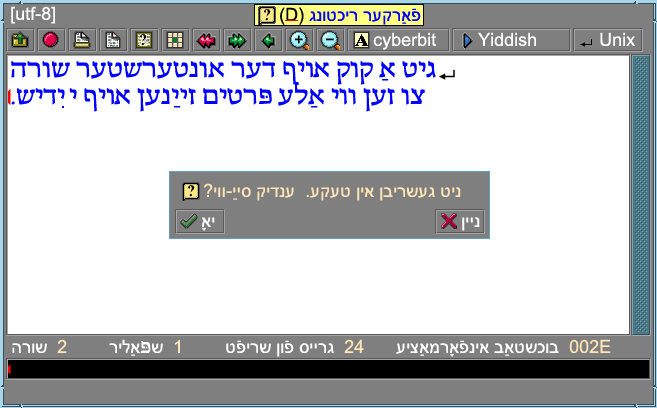
written the necessary translations for Yudit (screenshot)
and for AbiWord.
-
Can one check spelling, inserting customized spelling lists?
In Vim and AbiWord, the answer is yes, both in Romanized and Unicode Yiddish.
I have built these spelling lists.
Fonts
In Unix, you will be using the X-Windows System. I recommend you get
Markus Kuhn's fonts if you don't already have them in your X-Windows
distribution. They are present in X11R6.4.
The
-misc-fixed-medium-r-normal--20-200-75-75-c-100-iso10646-1
font has my modifications to make it complete and legible for Yiddish.
For TrueType fonts, I recommend FreeSans.
xkb
Instead of using X-windows keymaps, you can use the X keyboard extension, known
as xkb. This facility lets you establish several
keyboard layouts and switch between them. This facility is independent of all
X-windows applications. It does not give you multiple-key translations.
Here are instructions for Ubuntu Linux.
-
Make sure you don't have XKB_DISABLE set in your
environment variable.
-
As root, append to /usr/share/X11/xkb/symbols/us the
contents of this file.
-
In /usr/share/X11/xkb/rules, put the following line
at the end of the us: section (around line 269) of both base.lst and evdev.lst:
yiddish us: Yiddish
-
In /usr/share/X11/xkb/rules, put the following line
within the "us" <layout>, in the variantList after the Russian phonetic
variant, in both base.xml and evdev.xm::
       <variant>
          <configItem>
            <name>yiddish</name>
            <description>Yiddish</description>
            <languageList><iso639Id>yid</iso639Id></languageList>
          </configItem>
        </variant>
-
Run setxkbmap us
-
Using gnome-keyboard-properties, under the
"Layouts" tab,
-
Add a layout: By language → Yiddish
→ USA Yiddish
-
Set Layout Options so you know the keys to change
layout. You might want to use keyboard LED to show alternative layout.
-
Run setxkbmap -option
grp:switch,grp:alts_toggle
-
You can now use (1) whatever you set up in the previous step to switch
layouts, (2) the shift key to switch levels and (3) the right-alt key to switch
groups (a few keys have a second group of symbols). The keyboard looks like this pdf file. If you need to type non-precomposed
letters, separating an alef from its pasekh, for instance, use the vowels
positioned on the Q key or the group-two symbols on various other keys.
xterm
Versions of xterm since 2000 understand UTF-8. You can get
xterm and compile it
yourself if you need; you should stipulate
./configure --enable-wide-chars.
Limitations/bugs:
Xterm does not have any BIDI support. It composes
characters by simple overprinting unless it can find a precomposed character.
It puts precomposed characters in the cut buffer, not post-composed, as it
should.
Supporting file:
You might want to add this information to your
~/.Xdefaults file to support (1) a nice Unicode font (at "medium"
font size, and (2) a keyboard encoding for Yiddish (enable/disable with the
Mode_switch key).
Yudit
Gaspar Sinai's Yudit editor allows you to edit
UTF-8 text. Here is a screenshot.
I have built a keyboard
mapping for it that is part of the distribution. This mapping has a
multiple-key
front-end processor, so you can type "sh" if you want a shin. The
Yiddish mapping also inserts shtumer alef after a space before certain vowels.
Yudit also works with my XIM.
Yudit has its own truetype-font display engine, so you don't have to have one
in your X11.
Yudit has internationalization, so you can have all editor messages
presented in Yiddish.
Yudit does true BIDI display.
You will need to set your ~/.yudit/yudit.properties file
to have lines something like this:
yudit.default.language=yi
yudit.editor.font=iso10646
yudit.editor.fonts=arial,cyberbit,iso10646,caslr
yudit.editor.fontsize=20                |
yudit.editor.fontsizes=10,12,14,16,20,24
yudit.editor.input=Yiddish
yudit.editor.inputs=straight,unicode,Yiddish,Russian,German
yudit.font.arial=arial__h.ttf,cyberbit.ttf
yudit.font.caslr=caslr.ttf
yudit.font.cyberbit=cyberbit.ttf,CyberBitMods.ttf
yudit.font.iso10646=-misc-fixed-medium-r-normal--20-200-75-75-c-100-iso10646-1
yudit.editor.fonts=arial,cyberbit,iso10646,caslr
You might want the
Cyberbit font.
It is missing a few characters, which you can get by adding
CyberBitMods to the font paths.
You might also want the caslr font,
although it is not as pretty for Yiddish.
Yudit is capable of generating PostScript output.
There is a version of Yudit that runs on Win32 platforms that you can find
here.
Brief Win32 installation instructions:
(1) Run the executable you download to install the program (its name matches
this pattern: yudit*.exe
(2) Install the bitmap fonts by running the program that matches this pattern:
bitmap_fonts*.exe
(3) Using any text editor, modify
Program Files\Yudit\Config\yudit.properties as follows:
yudit.datapath=C:\Program Files\Yudit\data
yudit.fontpath=C:\WINNT\FONTS [for Win2000]
yudit.fontpath=C:\WINDOES\FONTS [for Win98]
Vim
Bram Moolenaar's Vim editor is a freeware
version of the ever-popular vi editor; it runs fine on both Unix and Win32.
Starting with version 6.0, it
has pretty good support for Unicode and Yiddish. Use it along with xterm (as
above) or in gvim mode (bypassing xterm) to get the full benefit.
Here is a screenshot of the gvim interface.
You don't
need the special character mapping stuff for xterm; use a Vim keymap instead.
Put these commands in ~/.vimrc:
setfileencodings=cp1255,utf-8 guifont=8x13bold encoding=utf-8
filetype plugin on
syntax on
You will want to know about the following commands:
:set rl  sets mode in current window to RTL
:set norl  sets mode in current window to LTR
:set keymap=yi  switches to the Yiddish keymap
:set encoding=utf-8 allows Vim to output well to your UTF-8 enabled xterm
<control-^>  toggles foreign-language input mode.
If you plan to mix languages,
I suggest you use multiple windows, one with rtl turned on, the other without.
Limitations/bugs:
Vim does not have any BIDI support and is unlikely to get any.
Supporting file:
Get this file and untar it in your home directory.
It includes spellcheck for Romanized and Unicode Yiddish and keyboard macros (a
full front-end processor) for Unicode Yiddish. It requires version 6.0 at
least.
Read the README file (it has instructions for Unix and for Win32).
AbiWord
AbiWord is a full-featured (eventually) word processor, not just a text editor.
It uses XML as its preferred file format, but it can import and export
formatted files and text files in Unicode.
The most recent versions of
the AbiWord word processor handle
BIDI. They also can do Hebrew letter-shaping, which means that final letters
are automatically generated, but the resulting file then contains medial, not
final letters; leave this feature turned off.
AbiWord has versions for Unix, MacOS, and Win32; all have similar look and
feel.
Here is a screenshot.
Much of the following is obsolete; AbiWord is a quickly moving target.
It is tricky to set up the fonts for AbiWord for Unix/X-Windows.
- In its fonts directory
(typically /usr/share/AbiSuite/fonts, you need to build a
subdirectory utf-8.
- Put a copy or a link to reasonable
true-type fonts there, such as arial.ttf.
- Run
ttmkfdir in that directory (find ttmkfdir
here).
This program extracts font names from your ttf files and builds
fonts.scale.
- In the
resulting file fonts.scale, make one new line for each font (there
will likely already be several with slightly different coding names).
On this new line, set the coding, which is the -iso suffix, to say
iso10646-1.
This suffix says "I am a Unicode font".
-
Run mkfontdir in that directory.
This program builds fonts.dir, which X-Windows needs to understand
the contents.
-
In AbiWord's bin directory, typically /usr/share/AbiSuite/bin,
run
ttfadmin.sh /usr/share/AbiSuite/fonts/utf-8 ISO-10646-1.
This program establishes auxiliary files *.u2g and *.t42 for each font.
AbiWord needs those auxiliary files to understand the fonts.
-
Your X-Windows server must understand both the font types usually used by
AbiWord and also True Type fonts, because only the Arial True Type font, so far
as I know, is widely available and supports Yiddish. You need at least version
4.1.0 of X-Windows. In its configuration file (typically
/etc/XF86Config), you need to have
  Load  "type1"
  Load  "xtt"
in the "Module" section.
If you have to add those lines, you need to restart X-Windows to have the
changes take effect.
-
Each time you run AbiWord, you should first set your LANG environment variable
to yi.utf-8.
The
.utf-8 part indicates what font set to use. The
first part says, "I prefer Yiddish throughout".
-
When you read in a UTF-8 text file, read it as type encoded text,
and then select UTF8 encoding in the resulting dialog.
-
I don't know a good way to map the keyboard. I use xmodmap and
switch between English and Yiddish maps. However, this technique requires that
you use multiple keystrokes to get vowels on an alef or lines above a beys or
any other multiple-utf8 character. I can give you the relevant xmodmap files
and a small tk program that lets you alternate among them.
-
When you exit AbiWord, you need to unset the LANG variable and also remove
extra directories from your fontpath that AbiWord sometimes leaves lying around:
xset fp- /usr/share/AbiSuite/fonts/ and
xset fp- /usr/share/AbiSuite/fonts/utf-8/.
I am working on a spelling checker for AbiWord/Yiddish.
I have spelling check files; ask me for details.
The following problems currently exist:
-
Getting AbiWord to understand spellcheck files for languages like Yiddish that
are not in its current list. I just call them Finnish files and set my
language to Finnish.
-
The interactive menu when a misspelling is found uses a non-utf8 font, so all
you see is gibberish.
mule
Mule 2.3 is an extension to the Gnu emacs 19.28 editor. It does not support
unicode, but it does support various language-specific code pages. It uses its
own peculiar "junet" file format for multilanguage files. I advise you to
avoid it.
emacs
There is an experimental (10/2003) version of emacs that handles UTF8 and
reportedly handles BIDI fairly well; it is at
http://www.m17n.org/emacs-bidi/.
Emacs is a full-featured editor, but it takes a lot of effort to learn it.
Update (7/2008): while BiDi support is not yet available for Emacs (except for
that experimental one and running emacs -nw (no graphics) in a
BiDi-capable terminal emulator), you can make use of
poor-mans-bidi.el,
which runs
the command line tools fribidi or bidiv as a subprocess to transform
logical input into visual output in a mirrored buffer.
There is also an input method for
Yiddish on Emacs
that handles a YIVO-like input, among others, written by Niels Giesen.
As of August 2010, a development branch of
Emacs supports bidirectional display
and obsoletes poor-mans-bidi.
KDE
KDE 3 is an "environment", including a window manager and many applications.
Its word-processing application is called KOffice. KOffice supports BIDI and
various encodings, including Unicode.
Summary
| Product | BIDI |
keyboard mappings | editor level
|
| xterm | none | single-key | no editing
|
| Vim | manual by buffer; only affects display
| multiple-key; good YIVO transcription
| full editing (use my spelling-checker plugin for Romanized or Unicode
Yiddish);
plain text only; monospace display only
|
| Yudit | automatic; only affects display
| multiple-key; good YIVO transcription
| acceptible editing; plain text only; allows True Type and
non-monospace fonts; generates PostScript.
|
| KOffice | ? | ?
| full "word processing"; inserts format codes; can output plain text
or XML or some other forms.
|
| AbiWord | automatic; only affects display | no
| full "word processing"; inserts format codes; can output plain text
or XML or some other forms.
|
References